Flukto gadgets
Small things that show the Flukto pulse on a desk, a shelf or a wall. Every gadget here runs on the public Pulse API; the firmware is ready to flash, no account, no key. New gadgets land on this page as they appear.
Flukto Globe
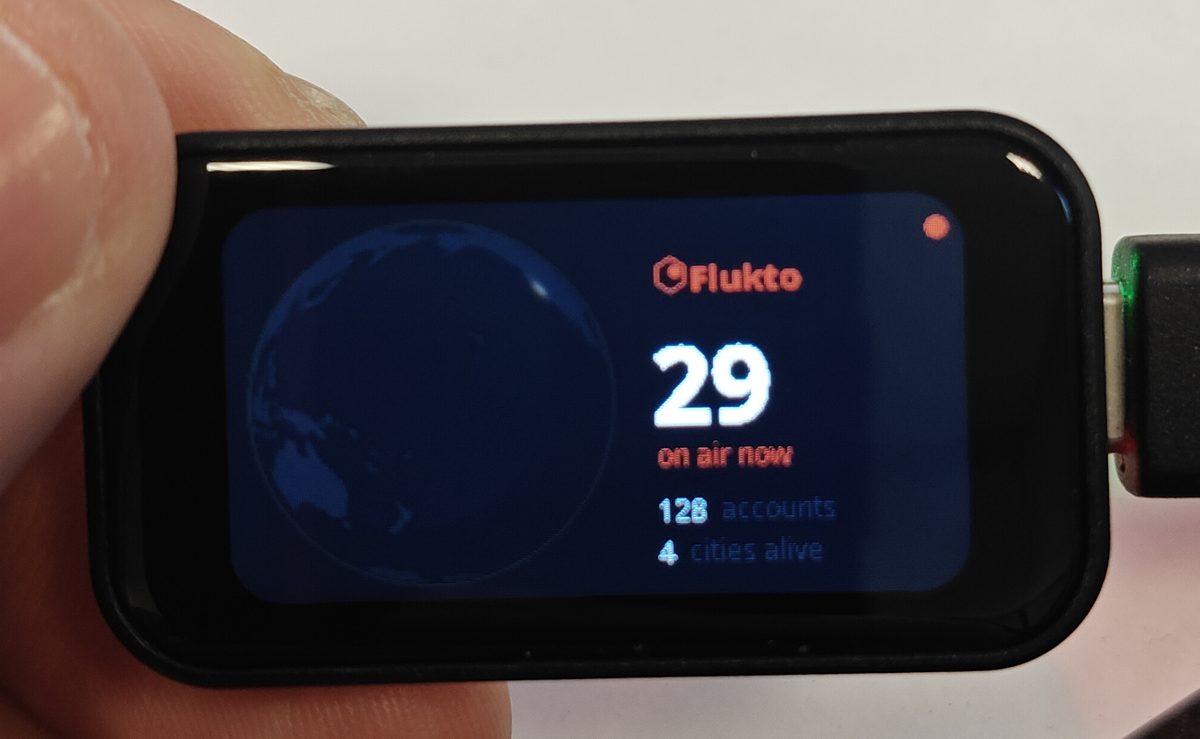
A slowly turning planet with the live heat map on the left, the number of people on air right now on the right, plus accounts and cities alive. A finger spins the globe. Refreshes every 20 seconds.
Hardware: Waveshare ESP32-S3-Touch-LCD-1.47 (ESP32-S3R8, 1.47" 172×320 touch display, USB-C). Nothing else: no wiring, no soldering.
Download: flukto-globe-esp32s3174-v1.1.0.bin (1.3 MB, one file for the whole flash) · SHA-256 · manifest.json for browser flashers.
Flashing
Plug the board into the computer with USB-C. Then either:
- Browser: open a web flasher that accepts a manifest (for example ESP Web Tools based pages), choose the serial port, point it at the manifest or the .bin at offset 0.
- Terminal with
esptool:
pip install esptool
esptool.py --chip esp32s3 --port /dev/cu.usbmodem101 write_flash 0x0 flukto-globe-esp32s3174-v1.1.0.bin
On Windows the port is COM3 or similar. If the board is not found: hold BOOT, plug in USB, release BOOT, try again.
First start
- The display says Wi-Fi setup. The board opens a Wi-Fi network called Flukto Globe.
- Join it with a phone or laptop and open
192.168.4.1. - Pick your home network, enter the password, save. The globe appears within a few seconds.
The password stays on the board. The gadget talks only to flukto.com, once every 20 seconds, and sends nothing but that request.
Build it yourself
The firmware is plain Arduino code (ESP32 core 3.x, Arduino_GFX, ArduinoJson, WiFiManager). The planet is drawn from cells of the Pulse API onto a 256×128 earth texture; the numbers are world.on_air, world.accounts and world.cities. If you make a different gadget from it, tell us: hallo@flukto.com.
Changelog
- 1.1.0 (12 October 2026): new line "open to chat": people who are not on air but reachable right now (switch on, app reported recently). Needs nothing on your side, same API.
- 1.0.0 (6 October 2026): first public firmware.